
The first hour after install: 8 checks on Oracle Linux 10 (subscription-free state, repos, time, SSH)
What you will learn
Section titled “What you will learn”What to check in the first hour after installing Oracle Linux 10. This page is a checklist with measured output: identity, kernel, subscription state, repositories, time sync, SSH, firewall, SELinux — each with the command and the real output from this environment.
1. Confirm identity: the Oracle coordinates in os-release
Section titled “1. Confirm identity: the Oracle coordinates in os-release”cat /etc/os-release && cat /etc/oracle-releaseNAME="Oracle Linux Server"VERSION="10.2"ID="ol"ID_LIKE="fedora"VERSION_ID="10.2"PLATFORM_ID="platform:el10"PRETTY_NAME="Oracle Linux Server 10.2"CPE_NAME="cpe:/o:oracle:linux:10:2:server"ID=ol and PLATFORM_ID=platform:el10 are the machine-readable proof that this is Oracle Linux in the EL10 family; ID_LIKE=fedora signals the package ecosystem resolves as RHEL-like.
2. Kernel: UEK is the default, RHCK is installed alongside
Section titled “2. Kernel: UEK is the default, RHCK is installed alongside”uname -r && grubby --default-kernel6.12.0-208.112.5.el10uek.x86_64/boot/vmlinuz-6.12.0-208.112.5.el10uek.x86_64Two things to note:
- Even when installing from the plain boot.iso (whose installer runs RHCK), the installed system boots UEK by default — this is an Oracle Linux distribution decision, not an install option;
rpm -qa | grep ^kernelshows bothkernel-6.12.0-211.72.1.el10_2(RHCK) andkernel-uek-6.12.0-208.112.5.el10uek— dual kernels coexisting is the norm; switching is covered in the UEK vs RHCK page.
3. Subscription state: no subscription-manager, and that is normal
Section titled “3. Subscription state: no subscription-manager, and that is normal”command -v subscription-manager || echo NOT-INSTALLEDdnf repolistNOT-INSTALLEDrepo id repo nameol10_UEKR8 Oracle Linux 10 UEK Release 8 (x86_64)ol10_appstream Oracle Linux 10 Application Stream Packages (x86_64)ol10_baseos_latest Oracle Linux 10 BaseOS Latest (x86_64)The minimal install does not carry subscription-manager, and does not need it: under Oracle Linux’s free-redistribution terms, subscription-free use works with the official repositories enabled out of the box. This is a completely different experience from RHEL, where an unregistered machine has no repositories. Registration only enters the picture when buying support (Ksplice, ULN access) — see the ULN / yum boundary page.
4. Time sync: chronyd is running
Section titled “4. Time sync: chronyd is running”systemctl is-active chronyd && chronyc tracking | head -3Measured active, with normal tracking output. The default time service on OL 10 is chrony (not ntp/ntpd). Switching to local NTP sources or checking the timezone is covered in the time & timezone page.
5. SSH: whether root can log in depends on one installer checkbox
Section titled “5. SSH: whether root can log in depends on one installer checkbox”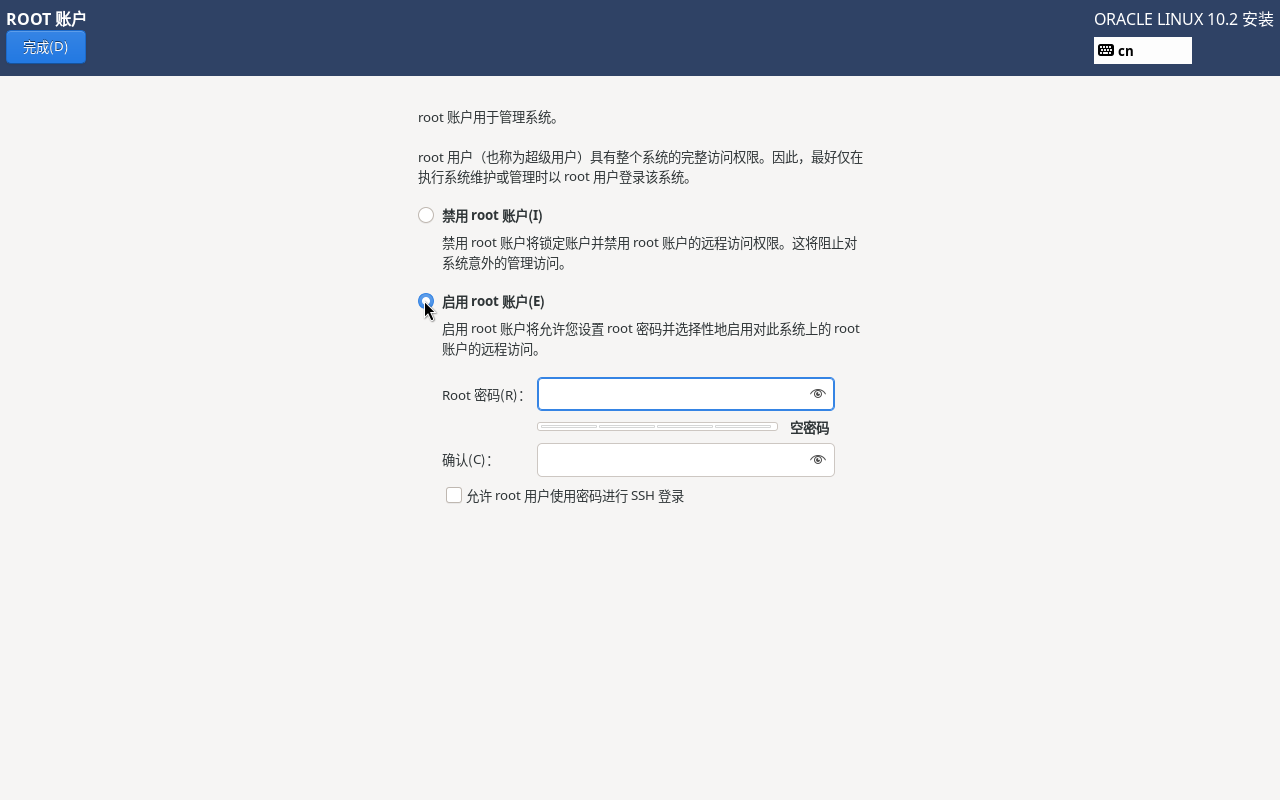
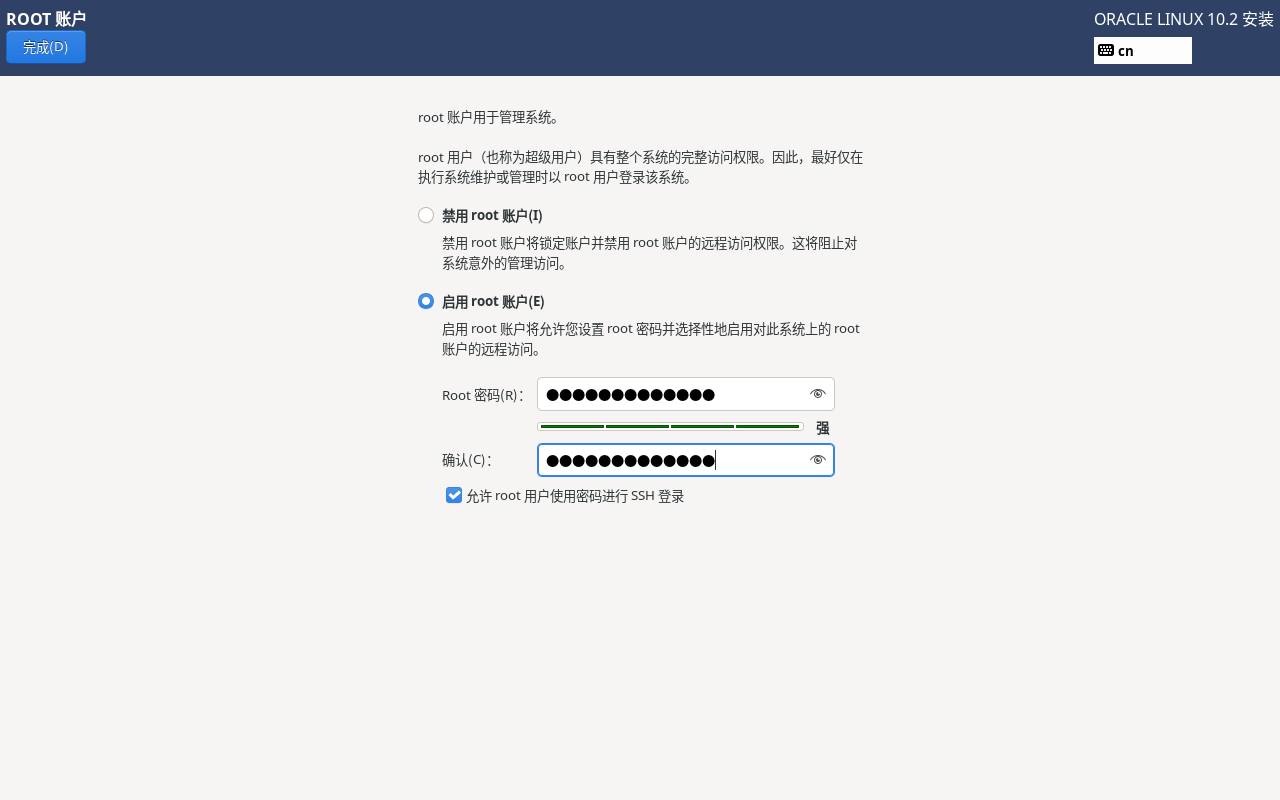
systemctl is-active sshd && grep -rhE '^PermitRootLogin' /etc/ssh/sshd_config /etc/ssh/sshd_config.d/Measured: on machines where ‘Allow root SSH login with password’ was ticked on the installer’s Root Account screen, the configuration lands as PermitRootLogin yes with sshd active. On machines where it was not ticked, root password login is refused (prohibit-password semantics) and entry is via the created regular user + sudo — part of the EL installer family’s recent lock-root default. Ticking it is a deliberate choice, not an omission.
6. Firewall and SELinux: both enforcing
Section titled “6. Firewall and SELinux: both enforcing”systemctl is-active firewalld && getenforceMeasured output: active and Enforcing. Open your service ports with firewalld right after install (see the firewalld page); when a service refuses to start under SELinux, check ausearch -m avc first — don’t rush to setenforce 0.
7. Package inventory: what exactly did the minimal install give me
Section titled “7. Package inventory: what exactly did the minimal install give me”rpm -qa | wc -l # this environment: 395dnf group list # installed environment group: Minimal Install; 14 groups availableA minimal install is 395 packages — not even subscription-manager or cockpit. To add components (development tools, container management, headless system management — 14 groups), see the minimal-install add-ons page.
8. kdump: on by default from the installer
Section titled “8. kdump: on by default from the installer”The installation summary shows KDUMP as enabled, kdumpctl status reports Kdump is operational, and the kernel command line carries crashkernel=1G-64G:448M,64G-:512M. A 2 GiB machine reserves 448 MiB — if that overhead matters on a small-memory box, see the kdump page for disabling and reconfiguration.
Checklist quick reference
Section titled “Checklist quick reference”| # | Command | Expectation |
|---|---|---|
| 1 | cat /etc/os-release | ID="ol", PLATFORM_ID=platform:el10 |
| 2 | grubby --default-kernel | points at an el10uek kernel |
| 3 | dnf repolist | 3 official repositories |
| 4 | systemctl is-active chronyd | active |
| 5 | systemctl is-active sshd | active |
| 6 | getenforce | Enforcing |
| 7 | rpm -qa | wc -l | ~395 (minimal install) |
| 8 | kdumpctl status | Kdump is operational |
Evidence and limits on this page
Section titled “Evidence and limits on this page”- Measured: all 8 steps above were executed on the Oracle Linux 10.2 minimal-install VM with per-step exit-code checks (E3 execution record);
- Not measured: subscription-manager behavior after registering ULN / buying support (requires a subscription account);
- Sources: OL 10 documentation home, Oracle Linux support policy.