RHEL 10.2 安装器:boot.iso 引导与 Anaconda 首屏
This content is not available in your language yet.
boot.iso 不是 DVD,它只负责“把安装器拉起来”,软件包从 inst.repo 指向的仓库取。本页在 PVE 399 上把 boot.iso 挂成 CD-ROM,验证引导菜单与 Anaconda 10.2 首屏;没有完成整机安装,只验证安装器的入口。
| 项目 | 值 |
|---|---|
| 文件 | rhel-10.2-x86_64-boot.iso |
| 大小 | 1,041,278,976 字节(约 993 MiB) |
| sha256 | 675001a587c15f0c56c09beca6b1576c3be63cc4a0754e375ce93a6afda3dc8a |
| VM | PVE 399,2C/3G/20G,ide2 挂 ISO,boot: order=ide2 |
校验:
sha256sum rhel-10.2-x86_64-boot.iso# 675001a5… rhel-10.2-x86_64-boot.isoE3 记录:plans/content-expansion/evidence/rhel/rhel-installer/run.json(5 步,含 ISO 哈希、VM 配置、两张截图)。
GRUB 四项菜单
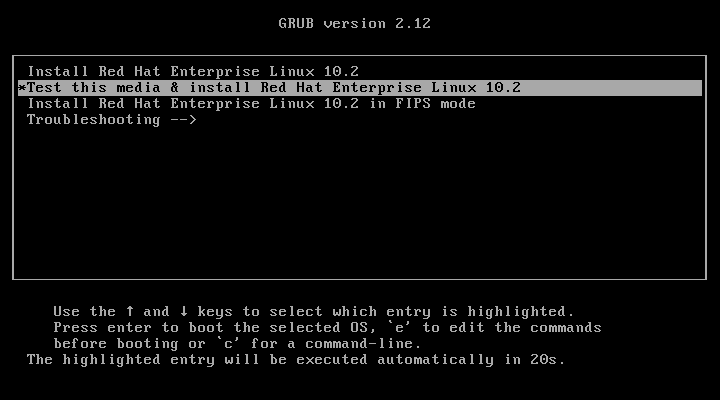
Section titled “GRUB 四项菜单”Install Red Hat Enterprise Linux 10.2Test this media & install Red Hat Enterprise Linux 10.2Install Red Hat Enterprise Linux 10.2 in FIPS modeTroubleshooting -->- 默认高亮第一项,20 秒后自动执行;
- 第二项会先校验介质,生产装机建议至少跑一次;
- FIPS 模式会启用 FIPS 加密策略,装完不能随意关;
- Troubleshooting 里有 rescue、内存测试等入口。
Anaconda 首屏
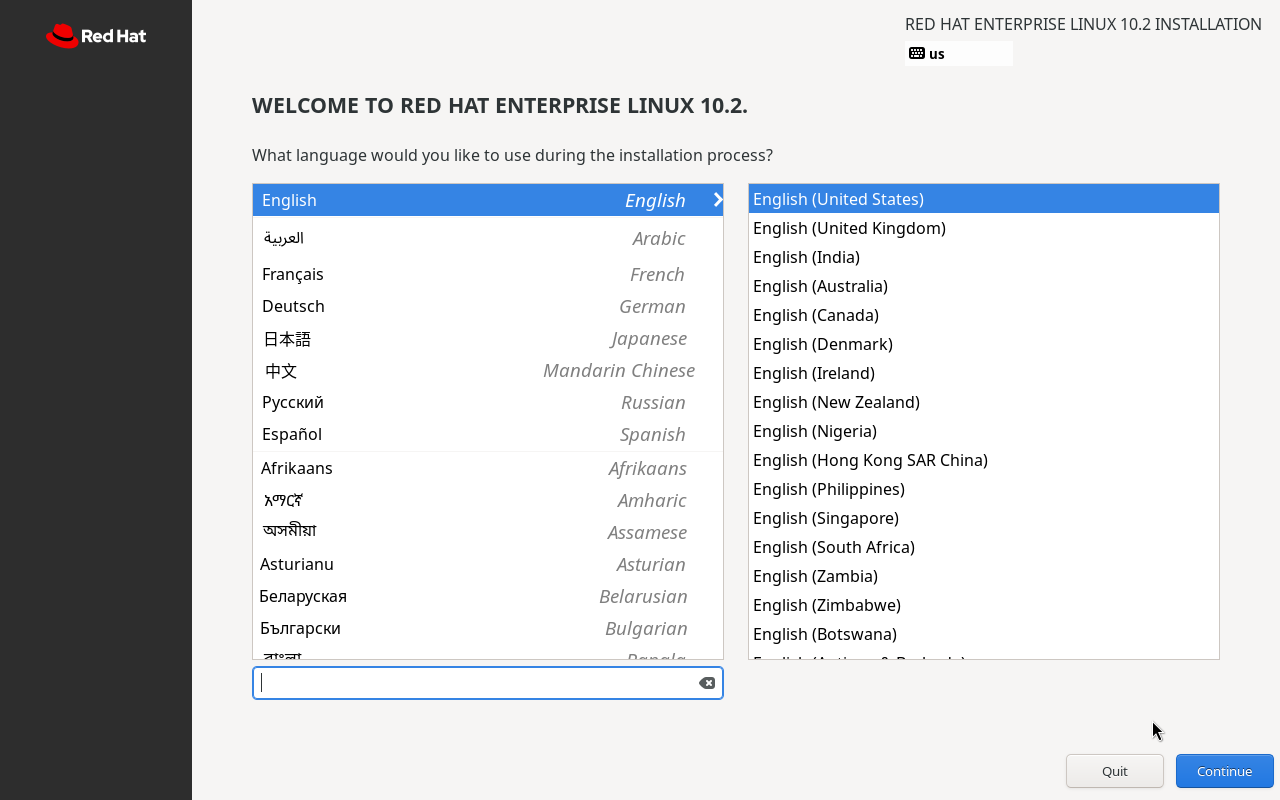
Section titled “Anaconda 首屏”进入后是图形化 Anaconda:
WELCOME TO RED HAT ENTERPRISE LINUX 10.2.What language would you like to use during the installation process?左侧语言列表含 中文(Mandarin Chinese),右侧是地区变体;选择后进入安装摘要(Installation Summary),再配置磁盘、网络、root/用户、订阅。
常用安装参数
Section titled “常用安装参数”在 GRUB 里按 e 编辑内核行,或 PXE 的 append 里加:
| 参数 | 作用 |
|---|---|
inst.repo=http://host/rhel10/ | 指定软件包仓库(boot.iso 必需) |
inst.ks=http://host/ks.cfg | 无人值守 Kickstart |
inst.text | 文本安装器(无图形) |
ip=192.168.2.242::192.168.2.1:255.255.255.0:rhel:eth0:none | 静态网络(PXE 常用) |
nameserver=223.5.5.5 | 安装环境 DNS |
inst.multilib=0 | 关闭 multilib(可选) |
未完成安装的边界
Section titled “未完成安装的边界”- 未执行完整安装(分区、订阅、用户创建均未做);
- 未测试
inst.ks无人值守; - 未测试 PXE/HTTP 仓库;
- 未测试 FIPS 模式安装后的
fips=1状态; - 截图是 PVE
qm monitor screendump,不是物理机截图。
- ISO 大小与 sha256 与下载页一致;
- VM 的
ide2指向 boot.iso,boot order含 ide2; - 至少跑一次 “Test this media”;
- 知道
inst.repo指向哪里; - 无人值守才用
inst.ks,并校验 ks 语法; - FIPS 模式装前确认合规要求。
- RHEL 10 采用评估 — 版本与默认项
- RHEL 订阅注册 — 装完后的注册
- 官方:Performing a standard RHEL installation
以下截图来自 PVE 上的实测环境,仅保留关键步骤。